
📲 Notification Settings – Truebooker
Admin > Truebooker > Setting > Notification Setting
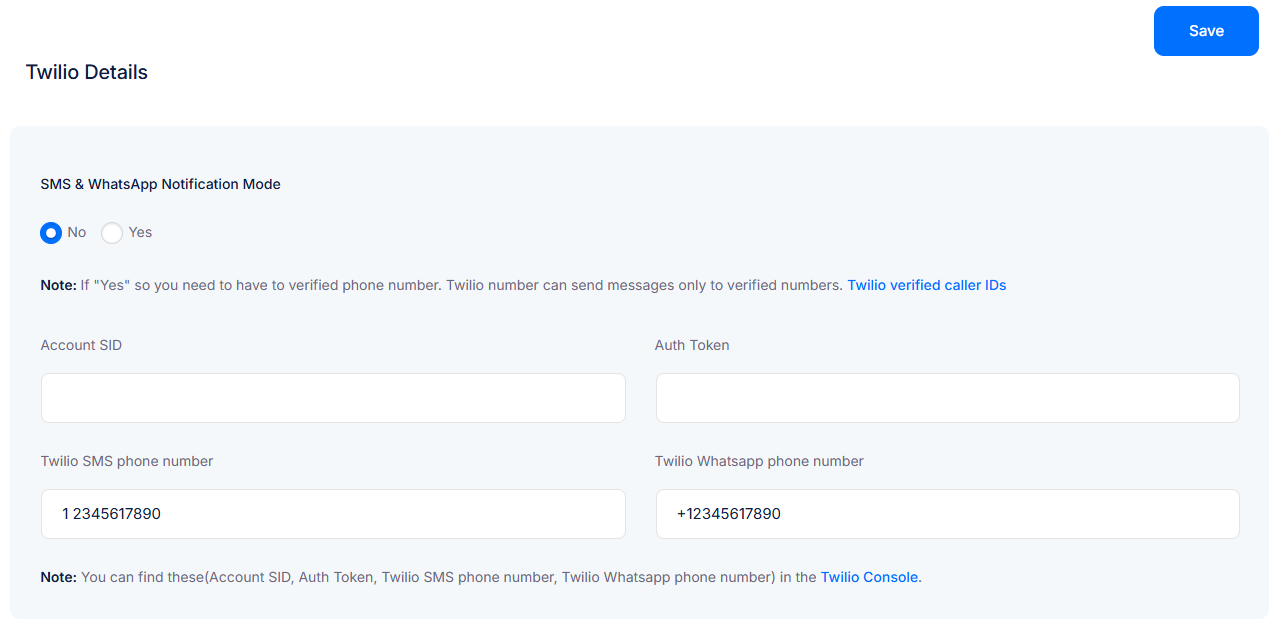
The Notification Settings allow you to send booking alerts via SMS and WhatsApp using the Twilio API.
This ensures customers and admins receive instant updates about bookings, cancellations, and reminders directly on their phones.
🔔 Twilio Account Requirement
To use SMS & WhatsApp notifications, you must have:
A valid Twilio account (Sign up at https://www.twilio.com/)
A Twilio phone number enabled for SMS and/or WhatsApp
An active Twilio plan with credits (Twilio charges per SMS/WhatsApp message sent)
⚠️ Important:
If you are on the Twilio free trial, you can only send messages to verified phone numbers.
To send notifications to all customers without restrictions, you will need a paid Twilio plan.
🛠 Required Twilio Credentials
From your Twilio Console, you will need:
Account SID – Your unique account identifier
Auth Token – Secret authentication token for API requests
Twilio SMS Phone Number – Number registered for SMS messages
Twilio WhatsApp Phone Number – Number registered for WhatsApp (format:
+1234567890)
👉 You can find all of these details inside your Twilio Console.
👉 Once configured, all booking confirmations, reminders, and cancellations will be delivered via SMS and WhatsApp, in addition to emails.


