
📊 Dashboard Overview - Truebooker
The Truebooker Dashboard gives you an instant snapshot of your entire business activity — from bookings and customer engagement to revenue insights. With everything presented in one clean view, you can track performance, spot trends, and make smarter decisions faster.
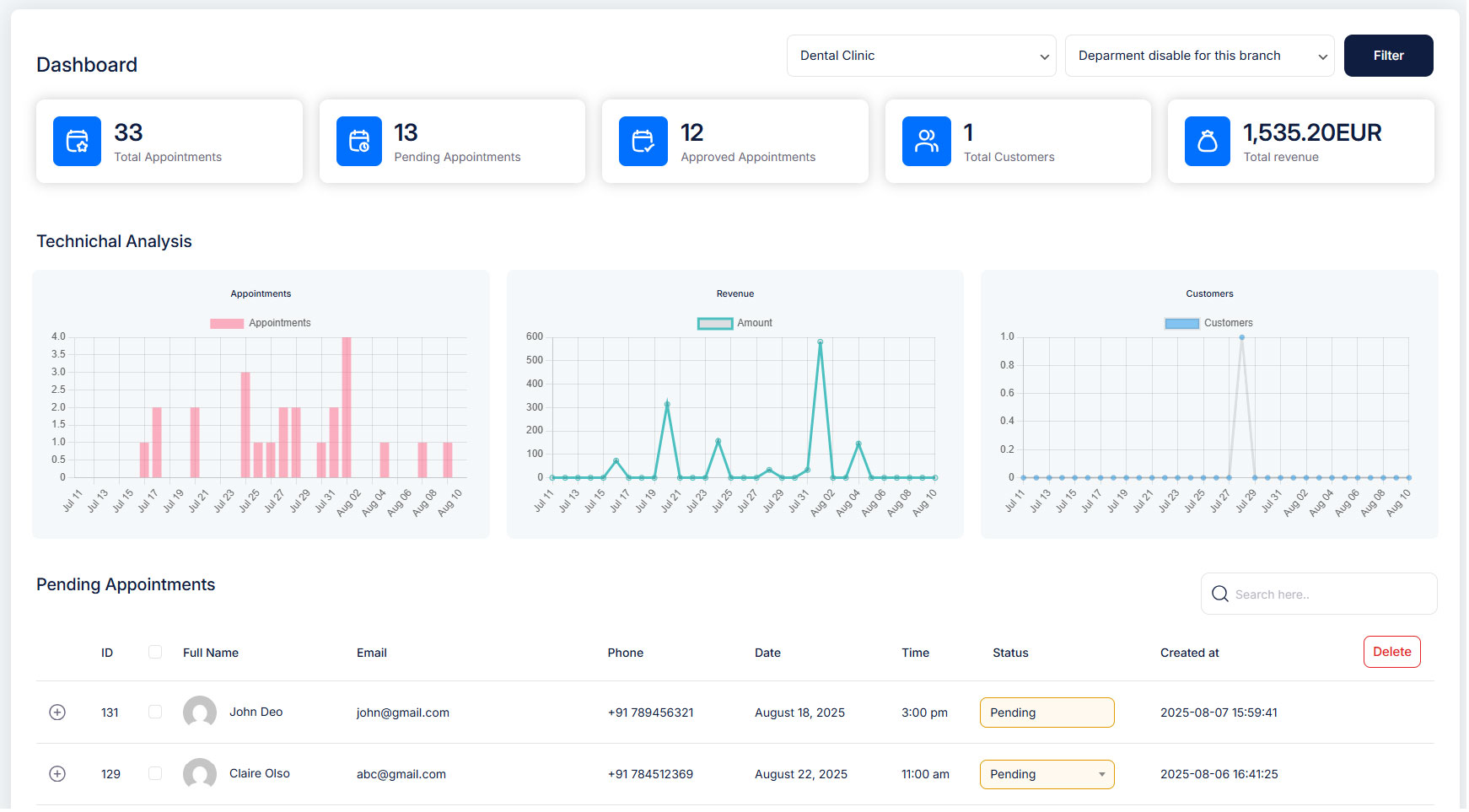
1️⃣ Top Summary Cards
- Total Appointments – Displays the total number of bookings made.
- Pending Appointments – Shows the count of appointments awaiting approval.
- Approved Appointments – Displays the number of confirmed bookings.
- Total Customers – Shows the number of unique customers in your system.
- Total Revenue – Displays the total earnings from bookings in USD.
2️⃣ Technical Analysis Charts
- Appointments – Visual representation of bookings over time.
- Revenue – Tracks total earnings across the selected date range.
- Customers – Displays the trend of new customers acquired.
3️⃣ Pending Appointments Section
- Lists all pending bookings requiring approval. If there are no pending bookings, you’ll see a “No Record Found!” message.
From the dashboard, you can:
✅ Approve a booking, ❌ Cancel a booking, 🗑️ Delete a booking, 🔍 Filter bookings by status, 👁 View booking details — Open a booking to see all customer info and service details
📧 Automatic Emails: Approve or cancel a booking and TrueBooker will email your customer for you.


